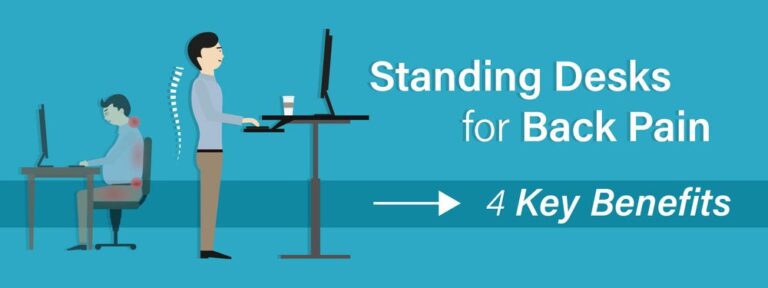
How Long Should You Stand at a Standing Desk Daily?

Most people should stand at a standing desk for short intervals that add up to about 1 to 3 hours across an 8-hour day. The better goal is to alternate sitting and standing every 30 to 60 minutes and keep moving regularly.
How long should you stand at a standing desk is best answered with a routine, not a single magic number. For most people, the healthiest approach is to alternate between sitting and standing throughout the day, using movement breaks to avoid staying in either position too long.
A standing desk can make a home office feel more active, but it is easy to overcorrect and assume more standing is always better. In practice, comfort, posture, task type, footwear, desk setup, and your current fitness level all shape what feels sustainable. The goal is not to stand for as many hours as possible. It is to create a workday that reduces long, static sitting without replacing it with long, static standing.
- Best starting point: Alternate sitting and standing every 30 to 60 minutes.
- Realistic daily total: Around 1 to 3 hours of standing suits many 8-hour workdays.
- Main priority: Regular movement matters more than maximizing standing time.
- Setup matters: Correct desk, monitor, and keyboard height prevent avoidable strain.
- Build gradually: Reduce standing time if soreness, foot pain, or back tension appears.
How Long Should You Stand at a Standing Desk Daily? A Practical 2026 Answer
A simple starting point: alternate sitting and standing every 30 to 60 minutes
If you are new to a sit-stand setup, a simple rhythm works best: sit for 30 to 60 minutes, then stand for 15 to 30 minutes, and keep rotating through the day. That pattern is easier to maintain than trying to stand for a full morning or afternoon block.
For many home office workers, this means accumulating roughly 1 to 3 hours of standing across a full workday, spread out in shorter sessions. Some people may comfortably build beyond that, but the key is that standing time should feel controlled and repeatable rather than forced.
Why total standing time matters less than regular movement
It helps to think of a standing desk as a movement tool rather than a standing challenge. Your body generally responds better to frequent changes in position than to staying fixed in one “healthy” posture for too long.
That means a day with several short sit-stand transitions, brief walks, stretches, and posture resets often feels better than a day with a strict target like “stand for four hours no matter what.” Regular movement can reduce stiffness, encourage circulation, and make desk work feel less physically repetitive.
Even while standing, try to shift weight, step back occasionally, relax your shoulders, and unlock your knees. A standing desk works best when it supports motion, not when it turns you into a statue.
What Current Guidance Suggests for Healthy Daily Standing Time
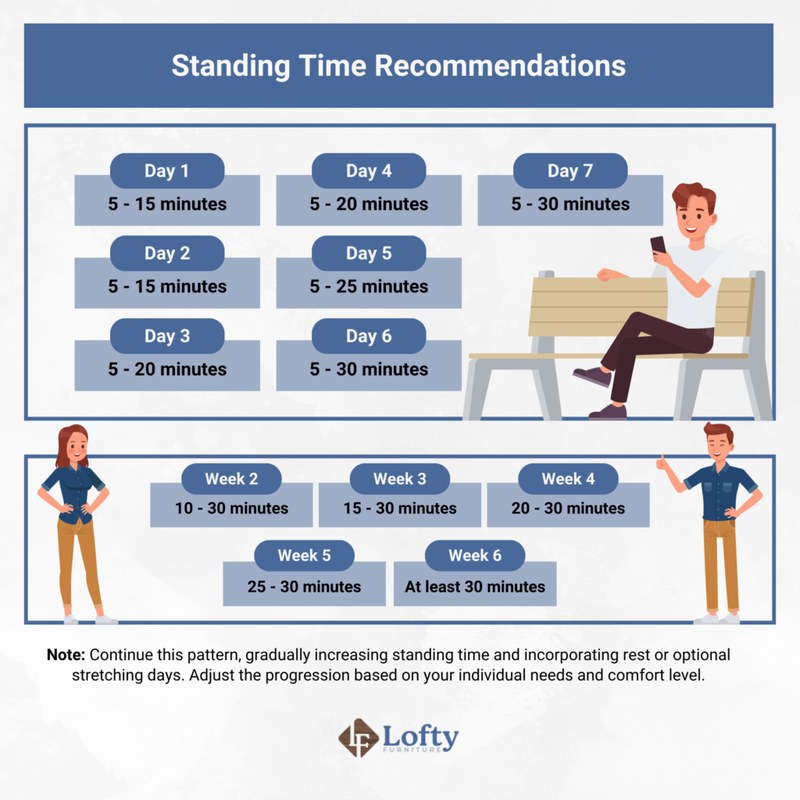
A worker uses a sit-stand desk beside a chart showing recommended daily standing time.
A realistic range for most home office workers
For most adults working at a computer, a realistic daily range is about 1 to 4 hours of standing during an 8-hour workday, broken into manageable intervals. That range is broad because workdays vary. Some people spend long stretches in deep focus and prefer more sitting, while others naturally stand more during calls or admin tasks.
If you work a shorter day, scale that range down rather than trying to hit the same total. A 4-hour work session might include 30 to 90 minutes of standing. A 6-hour day might include 1 to 2.5 hours. There is no need to force a full-day benchmark onto a part-time schedule.
Specific ergonomics guidance can vary by health organization and workplace context. If you have a medical condition, pain history, circulation concerns, or a recent injury, it is wise to confirm your routine with a qualified clinician.
How experience level, fitness, and workload change the ideal duration
The ideal amount of standing changes quickly from person to person. Someone who already walks often, changes position naturally, and has good lower-body endurance may adapt faster than someone moving from a very sedentary setup.
Your workload matters too. Detailed spreadsheet work, writing, and design tasks often feel best with more sitting support, especially when precision matters. Phone calls, reading, brainstorming, and light planning can be easier to do while standing. If you use a pen display or creative tools, the right desk depth and monitor placement become even more important; readers setting up a more visual workstation may also find Hurrell Editions’ guide to the best standing desk for artists helpful for comparing work-surface needs.
Body signals are useful here. Mild adjustment fatigue early on is common. Sharp foot pain, lower-back strain, numbness, or lingering discomfort are signs that your duration, posture, or setup needs to change.
When to reduce standing time and when to build it gradually
Reduce your standing time if you notice soreness that carries into the next day, swelling in the feet, unusual calf tightness, or increasing neck and shoulder tension. Those are often signs that the sessions are too long, the desk height is off, or you are standing too rigidly.
Build gradually if you feel generally comfortable but tire out by the end of each standing block. In that case, add 5 to 10 minutes to one or two sessions every few days rather than doubling your standing time all at once.
If you are brand new to standing desks, start with your easiest standing tasks first, such as email, calls, reading, or calendar planning. Save seated time for the most concentration-heavy work until your routine feels natural.
How to Find the Right Sit-Stand Routine for Your Workday
Best schedules for focused computer work, calls, and creative tasks
The best routine is usually task-based rather than clock-based. For focused keyboard work, many people prefer longer seated blocks with short standing breaks in between. For calls, meetings, reading, or idea generation, standing can feel more natural and energizing.
Creative work often benefits from a mixed approach. Writing drafts, sketching concepts, reviewing mood boards, or editing may feel good while standing for a portion of the session, but detailed production work often needs the stability of sitting. If you are refining a broader creative workspace, our guide on how to set up a home art studio space can help you think through layout and flow beyond the desk itself.
Sample standing desk ratios for 4-hour, 6-hour, and 8-hour days
These sample patterns are realistic for many home office schedules:
| Workday Length | Simple Sit-Stand Pattern | Approximate Standing Total |
|---|---|---|
| 4 hours | Sit 45 minutes, stand 15 minutes | About 1 hour |
| 6 hours | Sit 45 minutes, stand 15 to 20 minutes | About 1.5 to 2 hours |
| 8 hours | Sit 30 to 45 minutes, stand 15 to 30 minutes | About 2 to 3 hours |
These are not strict prescriptions. They are useful frameworks. If your work includes many calls, your standing total may rise naturally. If your day is heavy on deep focus, it may be lower.
Signs your routine is working well
A good routine usually feels almost boring in the best way: you are not thinking about it constantly, and you are not ending the day unusually stiff or drained. Your posture stays easier to maintain, your shoulders feel less compressed, and transitions between sitting and standing become automatic.
Other good signs include fewer long slumps in your chair, less desire to fidget from discomfort, and no lingering foot or back pain after work. If your routine helps you feel more alert without creating new aches, you are likely in the right range.
What to Look for in a Standing Desk Setup That Supports Longer Use
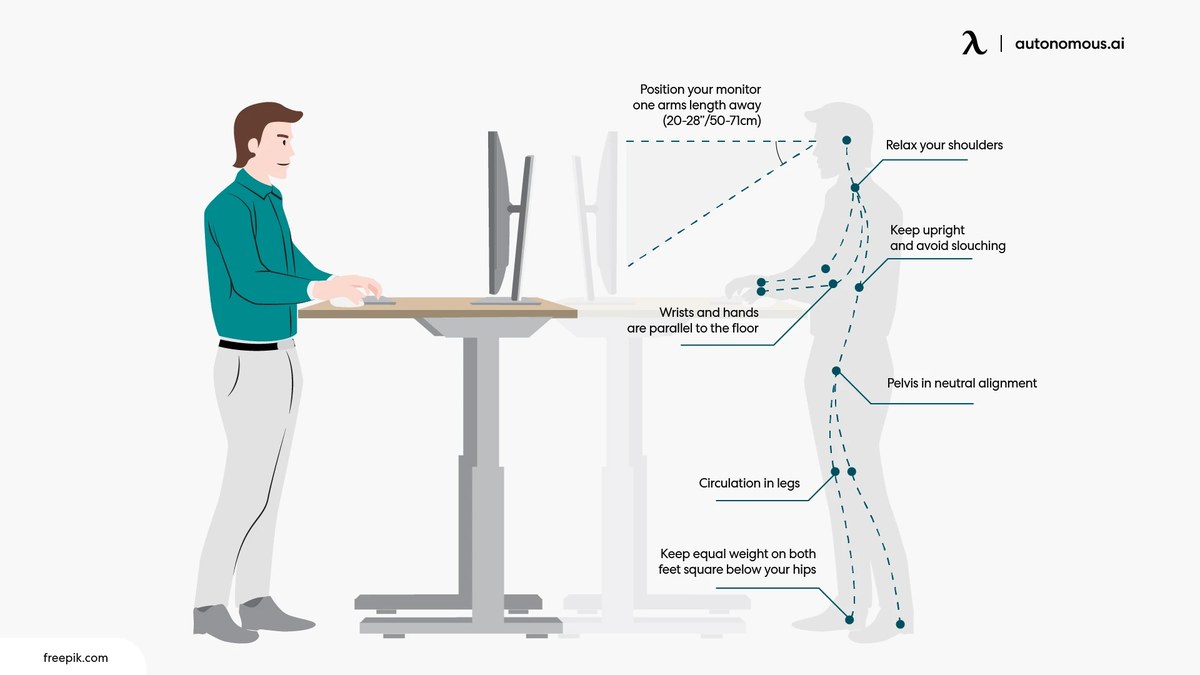
A standing desk setup with ergonomic accessories for longer, more comfortable use.
Desk height range, stability, and weight capacity
A standing desk is only as comfortable as its adjustment range and stability. The right model should lower enough for proper seated posture and rise enough for standing with your elbows near a relaxed 90-degree angle. If the desk does not fit your height range, even a well-built model can feel wrong all day.
Stability matters more than many buyers expect. Wobble becomes distracting during typing, writing, or monitor use, especially at taller heights. Weight capacity matters too, particularly if you use dual monitors, speakers, storage trays, or heavier creative equipment.
If storage is part of your setup, think carefully about how drawers, shelves, and accessories affect knee clearance and leg movement. Hurrell Editions has a useful primer on how to choose a desk with storage if you are balancing ergonomics with organization.
Keyboard, monitor, and laptop positioning essentials
Your elbows should rest comfortably by your sides rather than winging outward. Wrists should stay fairly neutral, not bent sharply up or down. The top of your monitor generally works best at or slightly below eye level, depending on screen size and eyewear needs.
If you work from a laptop alone, a separate keyboard and mouse usually make a big difference. Otherwise, raising the laptop screen puts the keyboard too high, and keeping the keyboard low puts the screen too low. Either way, something has to compromise unless you add accessories.
Monitor distance also matters. Too close can strain your eyes and neck; too far can make you lean forward. Small adjustments here often improve comfort more than increasing or decreasing standing time.
Anti-fatigue mats, footwear, and floor surface considerations
Hard flooring can make standing feel tiring much faster, especially on tile or thin laminate over concrete. An anti-fatigue mat can help reduce pressure underfoot and encourage subtle movement. Footwear matters too. Supportive shoes or cushioned house shoes often feel better than thin socks on a hard floor.
That does not mean everyone needs a thick mat or orthopedic-style shoe. The best combination depends on your floor surface, standing duration, and comfort preferences. The point is to remove avoidable strain from the equation.
- Use a supportive mat if you stand on hard flooring.
- Wear shoes or slippers with some cushioning for longer sessions.
- Keep one foot occasionally elevated on a small footrest if it feels better for your back.
- Standing barefoot on a hard surface for long blocks if it causes fatigue.
- Assuming discomfort means you need to “push through.”
- Using a mat so thick that it makes the desk unstable under rolling chair use.
Key materials and specifications that affect comfort and durability
For everyday use, pay attention to desktop depth, edge shape, frame construction, motor noise, and control simplicity. A desk with enough depth for your monitor and keyboard helps prevent cramped posture. Softer front edges can feel better on forearms than sharp, squared edges.
Frame design affects side-to-side wobble, especially at full extension. Desktop materials influence scratch resistance, cleaning needs, and overall feel, but comfort usually comes down more to dimensions and stability than to surface finish alone.
Before buying, confirm the official product listing for lift range, maximum load, warranty terms, and any accessory compatibility. Those details vary widely by model.
Who a Standing Desk Routine Suits Best and Which Home Office Setups It Fits
Ideal users, room types, and work styles
A sit-stand routine suits people who spend long hours at a computer, feel stiff from prolonged sitting, or want more variation in the day without leaving the desk repeatedly. It can work especially well in home offices where the desk is the main work zone and there is enough clearance to move around comfortably.
It also suits multi-use creative rooms, provided the desk surface supports the type of work you do. If your office doubles as a studio, guest room, or library, the desk should still leave enough circulation space and storage access when raised.
When a compact converter works better than a full standing desk
A converter can be a smarter choice if you already own a sturdy desk you like, have a tighter budget, or need a less permanent option for a rental. It can also make sense in rooms where replacing the full desk would disrupt storage or style cohesion.
The tradeoff is that converters often provide less usable depth, less flexibility for monitor arms, and a more layered look. For some people that is perfectly fine. For others, a full sit-stand desk feels cleaner and easier to use every day.
How to make a standing desk work in small, shared, or design-led spaces
In a smaller room, prioritize cable management, wall clearance, and chair storage so the desk can rise without visual clutter. In shared spaces, quieter motors and a tidy footprint matter more. In design-led interiors, look for finishes and leg profiles that feel intentional rather than purely corporate.
If you are working within a compact footprint, compare the raised depth of the setup, not just the width. That detail affects how easily you can stand, type, and move without crowding the room.
The Benefits of Standing More and the Limits to Know Before You Overdo It
Potential gains for posture, energy, and workday variety
The biggest benefit of a standing desk is often variety. Alternating positions can help break up sedentary time, reduce the mental drag of staying planted in one posture, and make it easier to reset your body during the day.
Some people also notice improved alertness during meetings or admin tasks, and some find that standing encourages better monitor height awareness and less slouching. Those benefits are practical rather than dramatic, which is exactly why they tend to be sustainable.
Why standing all day is not the goal
Standing all day is usually no better than sitting all day. Both are static loads on the body when done for too long. Prolonged standing can contribute to foot fatigue, lower-back discomfort, and general tiredness if posture and movement are neglected.
The best outcome is balance: more position changes, more small movement opportunities, and less uninterrupted time in any one posture.
Evidence limitations and what research does not prove
It is important not to overstate the evidence. Standing desks are not a cure-all for back pain, poor fitness, or the broader effects of inactivity. Research can show associations and likely benefits in some settings, but it does not prove that simply buying a standing desk will transform health outcomes on its own.
Other factors still matter: total daily activity, exercise, workstation fit, sleep, stress, and pre-existing health conditions. A standing desk can support a better routine, but it cannot replace movement outside work.
Common Standing Desk Mistakes That Cause Fatigue, Pain, or Poor Posture
Standing too long too soon
This is the most common mistake. People get a new desk, feel motivated, and try to stand for half the day immediately. That often leads to sore feet, tight calves, and frustration that makes the desk feel like a failed purchase.
Short, repeatable sessions are far more effective than dramatic first-week goals.
Incorrect monitor and elbow height
If the desk is too high, your shoulders rise and your wrists bend. If it is too low, you hunch forward and collapse through the upper back. Monitor height errors can also create neck extension or downward head tilt that becomes uncomfortable over time.
These setup problems are easy to misread as “standing desk discomfort” when the real issue is ergonomics.
Locked knees, static posture, and ignoring movement breaks
Standing well does not mean standing rigidly. Locked knees, clenched glutes, and fixed weight distribution can make standing feel worse than it should. Small shifts, step-backs, and short walks are part of the routine, not a sign that you are doing it wrong.
Set reminders if needed. Even a well-adjusted desk cannot compensate for staying still too long.
Using the wrong chair, shoes, or accessories
A sit-stand desk still depends on a good seated setup. If your chair is unsupportive, too high, too low, or awkward to move in and out of position, transitions become annoying and your overall posture suffers. The same goes for poorly placed monitor arms, overly shallow keyboard trays, or footwear that makes standing unnecessarily harsh.
If pain is persistent, radiating, or worsening, do not assume an ergonomic tweak will solve it. Reduce standing time and seek qualified medical advice, especially if you have circulation issues, joint conditions, or recent injuries.
Care, Maintenance, Value, and the Final Recommendation
How to maintain the desk mechanism, surface, and accessories
Keep the lifting columns and underside clear of dust buildup, avoid overloading the desk beyond the manufacturer’s stated limit, and check that cables have enough slack at both seated and standing heights. Wipe the surface according to the maker’s care instructions, since laminate, veneer, solid wood, and powder-coated frames can all have different cleaning needs.
If the desk develops wobble, confirm that fasteners are tightened and accessories are mounted correctly. For motorized models, it is also worth reviewing the official troubleshooting and reset instructions from the manufacturer before assuming the mechanism has failed.
When a standing desk is worth the investment
A standing desk is usually worth it if you work from home regularly, expect to use the adjustment feature daily, and are willing to fine-tune the setup around your body and tasks. It is less compelling if you rarely change positions, have very limited space, or are buying one mainly because it seems like the “healthy” thing to do without a plan for using it.
Value comes from fit and habit, not from the category alone. A modest desk used well can outperform an expensive one used poorly.
The most sustainable daily standing target for most people
For most home office workers, the most sustainable target is not “stand all day” or even “stand half the day.” It is to build toward roughly 1 to 3 hours of standing across a full workday, divided into short sessions, while continuing to sit, walk, stretch, and reset posture regularly.
That approach is practical, easier to maintain, and less likely to create new discomfort. If you want one simple rule to remember, make it this: alternate often, move often, and let comfort guide gradual progress.
- Start by alternating sitting and standing every 30 to 60 minutes.
- Aim for roughly 1 to 3 hours of standing in an 8-hour day if that feels comfortable.
- Prioritize movement, desk fit, monitor height, and supportive flooring over chasing a bigger standing total.
- Build gradually and reduce standing time if pain or next-day soreness appears.
Frequently Asked Questions