Best Standing Desk Cable Management Ideas for Clean Setups

A standing desk can make an artful home office feel lighter, calmer, and more intentional, but loose cords often undo that effect fast. Charging bricks, power strips, monitor cables, and adapters can turn a sculptural desk into visual noise, especially when the desk moves up and down through the day.
This guide is for creative professionals, remote workers, and design-minded shoppers who want standing desk cable management that supports both function and atmosphere. The picks below focus on practical wire control, cleaner sightlines, and solutions that suit polished home offices rather than purely utilitarian setups.
The best standing desk cable management ideas combine an under-desk tray for power strips and adapters with a flexible cable spine that guides cords from the desktop to the floor. For most shoppers, clamp-on trays are the easiest starting point, while vertebrae-style spines are especially useful for height-adjustable desks that move often.
Quick Product Comparison
| Product | Image | Best For | Today’s Price |
|---|---|---|---|
| 1. Univivi 36-Inch Cable Tray | 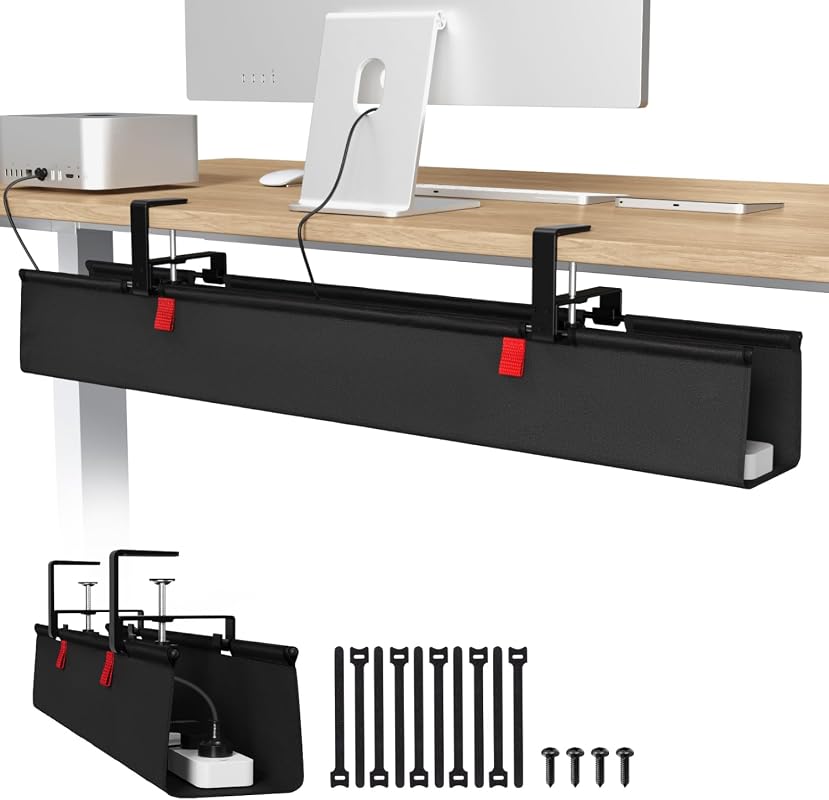 |
Large setups with multiple adapters and power strips | See Price → |
| 2. Ultimate Setup Cable Vertebrae | 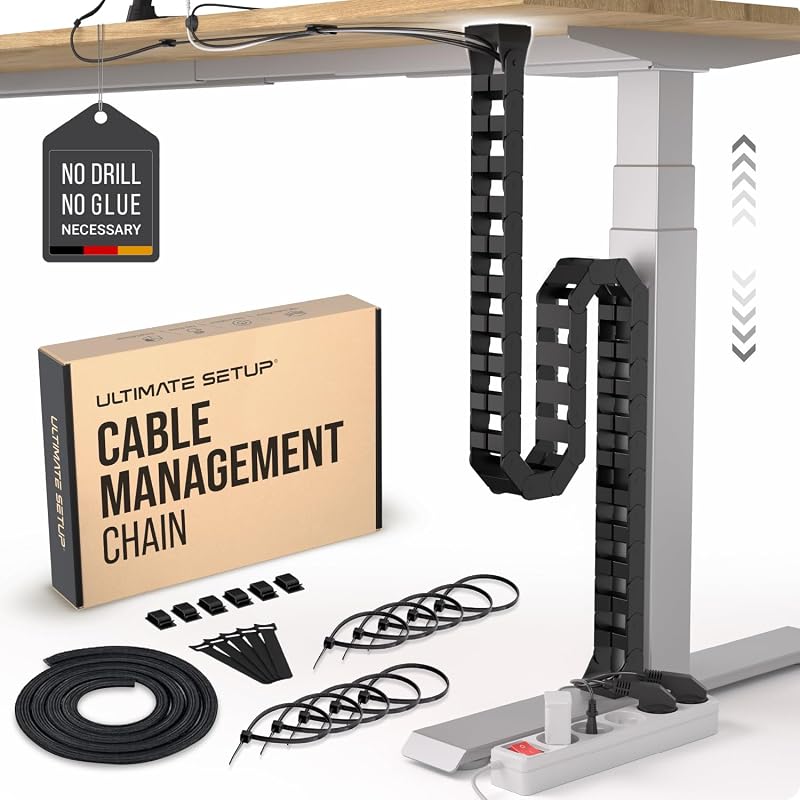 |
Sit-stand desks that need a flexible floor-to-desk cable path | See Price → |
| 3. Ultimate Setup Cable Vertebrae | 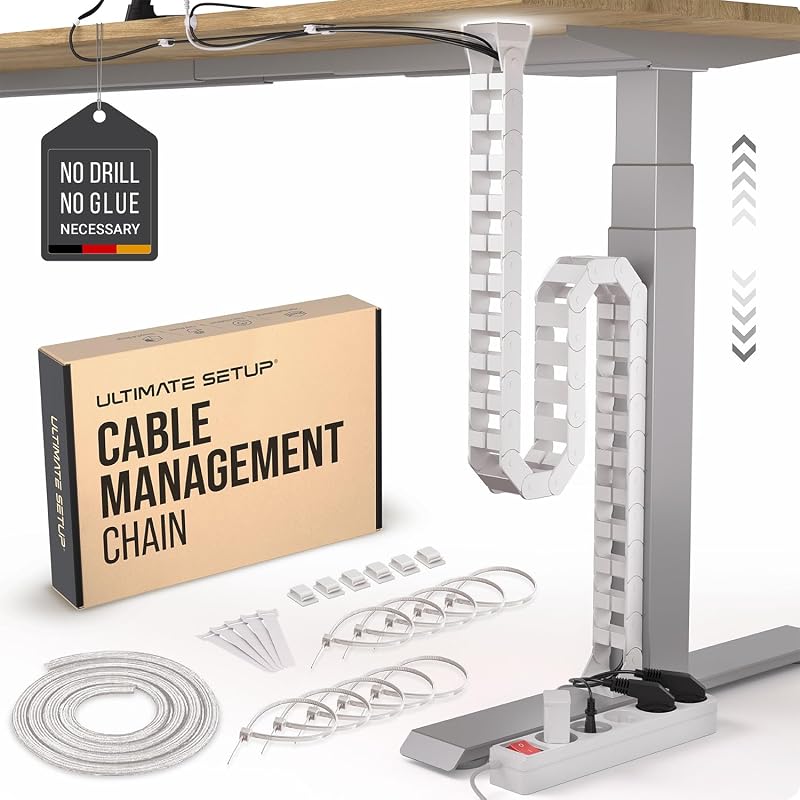 |
White desks and lighter minimalist interiors | See Price → |
| 4. Metal Mesh Cable Tray | 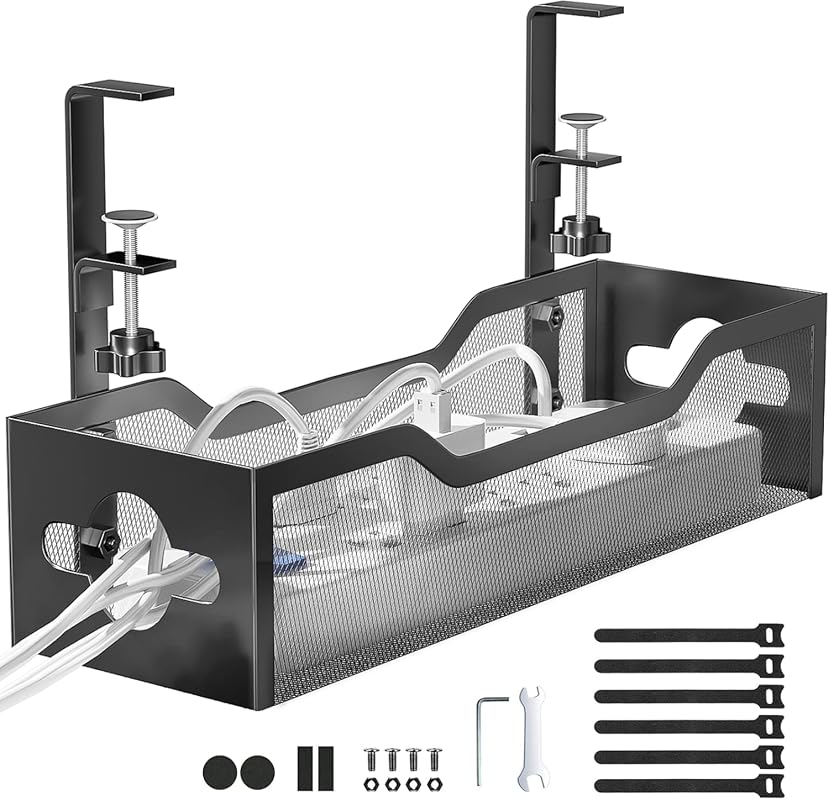 |
Budget-friendly everyday cord cleanup | See Price → |
| 5. Under Desk Cable Tray | 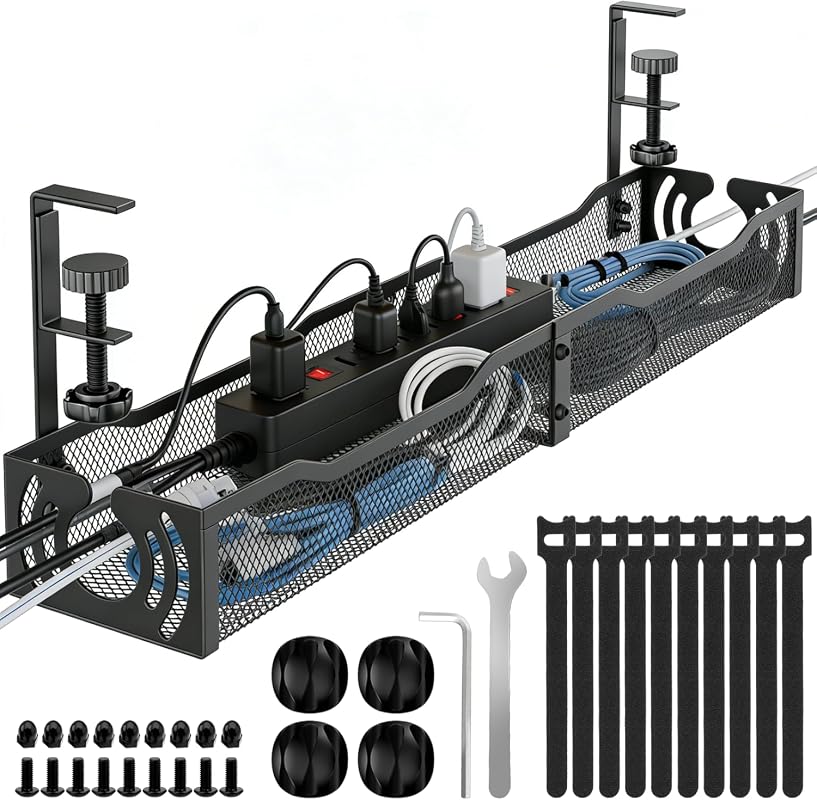 |
Compact workstations that still need metal strength | See Price → |
| 6. Fabric Cable Management Tray | 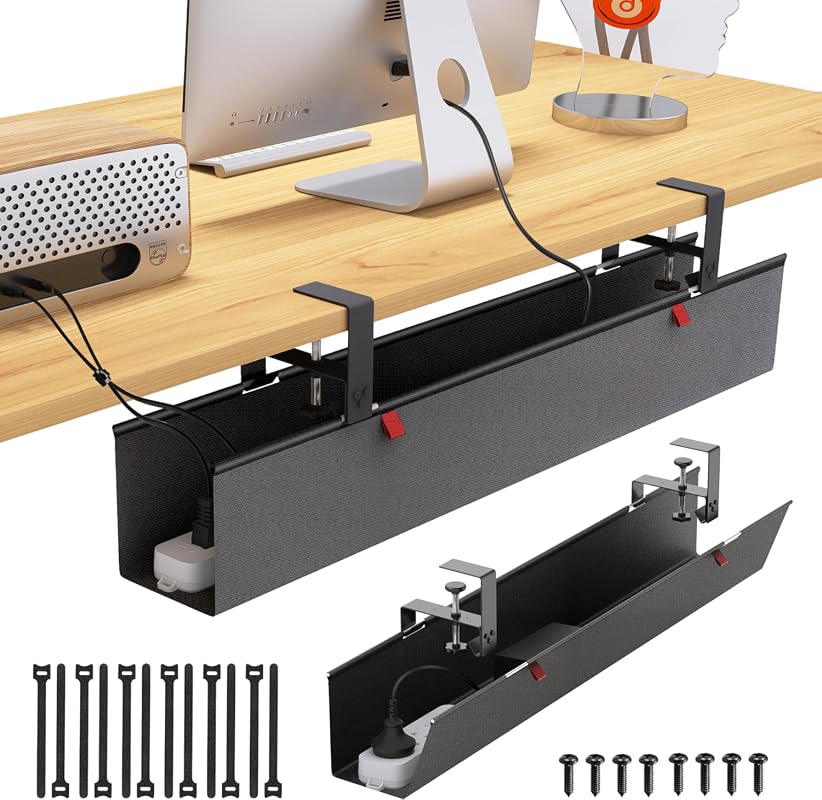 |
Soft-look setups that want hidden cords and included accessories | See Price → |
| 7. Scanfield Cable Tray Set |  |
Modular cable runs and longer under-desk layouts | See Price → |
| 8. VIVO Desk-AC01C Cable Kit | 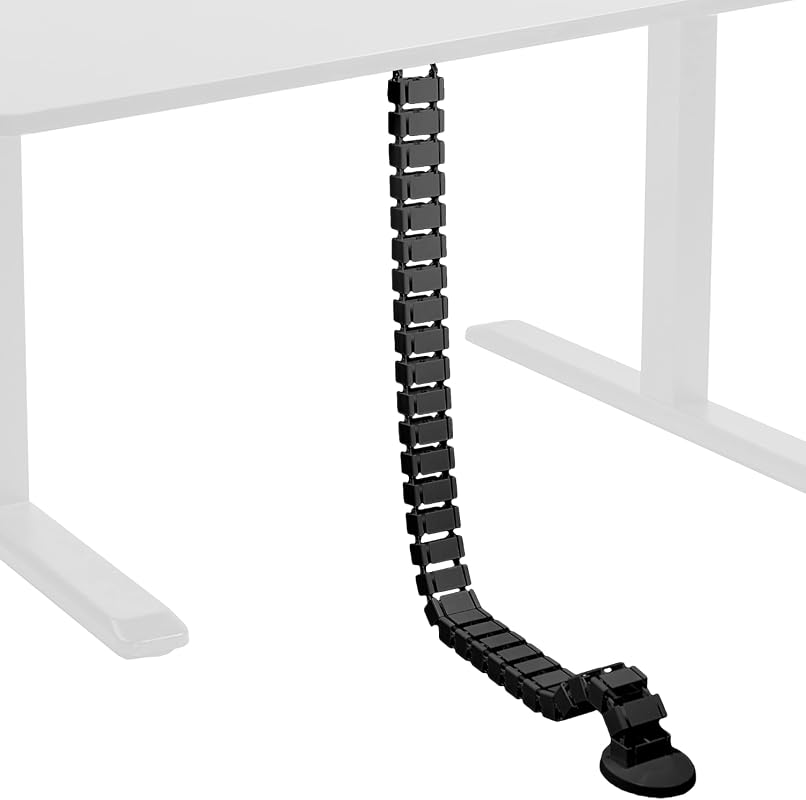 |
Long desk-to-floor routing on adjustable desks | See Price → |
What to Look for in standing desk cable management
Movement-friendly routing
Height-adjustable desks need more than simple cord hiding. As the desk rises and lowers, cables need a controlled path that bends without snagging. Vertebrae-style spines are especially useful here because they guide cords from desk to floor in a more deliberate line.
Installation that suits your desk
Clamp-on systems are often the easiest fit for renters or anyone who wants to avoid drilling into a desktop. Screw-mount options can be useful when you want a more fixed installation, but it is smart to verify desk material, edge clearance, and thickness first. If you are still refining your ergonomics, our height of standing desk guide for better posture pairs well with cable-planning decisions.
Capacity for adapters and power strips
A slim tray may look tidy at first but can feel crowded once you add surge protectors, charging bricks, and monitor cables. Larger baskets and trays work better for artful home offices with lamps, speakers, tablets, and layered tech. Open access also makes it easier to swap gear as your setup evolves.
Visual weight and finish
In a creative workspace, cable management should disappear into the composition rather than compete with it. Black mesh and black fabric usually recede under darker desks, while a white cable spine can look more integrated with pale Scandinavian or gallery-like interiors. This matters even more if you are building a setup around pieces from our guide to the best standing desk for artists.
Airflow and everyday upkeep
Open mesh and ventilated designs can help reduce dust buildup and allow heat to escape more easily around power strips. Fabric trays can look softer and less industrial, but they may require a bit more attention when you want to quickly inspect what is inside.
For the calmest visual result, pair one under-desk tray with one floor-to-desk spine instead of scattering small clips everywhere. The effect is cleaner, more architectural, and easier to maintain over time.
Our Top 8 Standing Desk Cable Management Picks and Reviews
1. Univivi 36-Inch No-Drill Under Desk Cable Management Tray for Clean and Organized Workspaces
This large-format under-desk tray stands out for shoppers who want to hide a substantial amount of cable clutter without immediately moving to a more industrial-looking setup. Its long 36-inch size and dual installation options make it a strong all-around choice for creative workstations with several powered devices.
Key Features That Stand Out
- 36-inch tray size is designed to hold adapters and sockets, which matters for larger desks with monitors, lamps, and charging gear.
- Supports both no-drill clamp-on and screw fixing installation, giving more flexibility across wood, glass, and metal desks.
- Unfolding design makes it easier to add or remove items as your setup changes.
- 600D Oxford fabric is described as flame retardant, with bottom support intended to help maintain shape under heavier loads.
Why It Stands Out
Many cable solutions solve only the floor-to-desk problem or only the power-strip problem. This one is more compelling because it addresses bulk storage under the desktop while still giving you options on how to mount it. For a creative home office where visual calm matters, a roomy tray can do more to reduce clutter than several smaller accessories.
Best For
Anyone with a large standing desk, multiple adapters, or a layered work-from-home setup that needs high-capacity hidden storage under the desktop.
Pros and Cons
- Large capacity for bigger cable bundles and power accessories
- Clamp-on or screw-mount installation options
- Fabric construction can look softer than exposed metal baskets
- Requires edge space for clips and will not be completely invisible
- Desk drawers or back support bars may limit compatibility, so measure carefully
2. Ultimate Setup Adjustable Cable Management Vertebrae for Sit Stand Desks, Flexible Under Desk Spine
This flexible cable spine is tailored to the movement of sit-stand desks, making it a smart alternative if your biggest issue is not under-desk storage but the visible cable drop from desktop to floor. Its magnetic attachment and quick installation focus on neatness with minimal fuss.
Key Features That Stand Out
- Adjustable vertebrae can be shortened and moved silently as needed, which suits desks that change height often.
- Magnetic attachments help the system stay secured to the table leg during desk adjustment.
- Included accessories support easier organization and access to cables.
- Advertised installation time is under 5 minutes with multiple mounting options.
Why It Stands Out
For artful home offices, the cable line from desk to floor is often the most disruptive visual element. This product directly addresses that issue with a more sculptural, controlled route. It is especially relevant if you already have a tray or basket and want the final piece that makes the whole desk look more composed. It can also complement broader stand up desk setup ideas for a healthier workspace when you are refining both posture and appearance.
Best For
Sit-stand desk owners who want a cleaner, more elegant cable drop from the underside of the desk to the floor.
Pros and Cons
- Designed specifically for standing desk movement
- Magnetic attachment supports a tidy look on the desk leg
- Quick installation with included accessories
- Better for routing visible cable runs than for storing bulky power strips
- You may still want a separate under-desk tray for adapters and surge protectors
3. Ultimate Setup White Cable Management Vertebrae for Sit Stand Desks, Flexible Under Desk Spine
This white version brings the same movement-friendly concept as the black Ultimate Setup model but with a finish that can blend more gracefully into pale desks and bright studio corners. For style-conscious shoppers, that color difference can have real visual value.
Key Features That Stand Out
- Flexible vertebrae can be shortened and adjusted for changing desk heights.
- Magnetic attachments help keep the spine aligned to the desk leg.
- Accessories are included to support easier cable organization.
- Installation is described as fast and compatible with every table and desk cable duct.
Why It Stands Out
Value is not only about the lowest cost. In a design-led office, a white cable spine can disappear much better against white desk legs, pale walls, or light flooring than a black one would. That makes this a thoughtful option for shoppers who care about visual continuity as much as basic function.
Best For
Minimalist or gallery-inspired home offices with white desks, light palettes, and visible desk legs.
Pros and Cons
- Movement-friendly design for sit-stand desks
- White finish may blend better in lighter interiors
- Fast installation with included accessories
- Like most spines, it does not replace a full-capacity under-desk tray
- Color matching is a style advantage only if your desk and room palette are light
4. No-Drill Metal Mesh Under Desk Cable Management Tray with Clamp Mount for Home Office Desks
This metal mesh tray is a practical choice for shoppers who want a straightforward clamp-on solution with broad everyday usefulness. The open basket design, desk-protecting pads, and flexible inward or outward installation make it easy to adapt in a busy home office.
Key Features That Stand Out
- No-drill assembly is described as taking about 3 minutes or less.
- Soft rubber pads on the clamps help protect the desk surface from scratches.
- Carbon steel construction is rated to hold about 15 pounds.
- Mesh design and side holes support freer cable routing and may reduce dust buildup.
Why It Stands Out
Not every creative workspace needs a highly styled system. Sometimes the best answer is a reliable tray that installs quickly, protects the desk, and keeps cords off the floor. This one has a utilitarian look, but the mesh form can still feel visually light under a desk rather than bulky.
Best For
Budget-conscious shoppers who want a quick, sturdy under-desk basket for cords, USB hubs, and power strips.
Pros and Cons
- Fast no-drill setup
- Rubber-padded clamps help protect furniture
- Open mesh encourages airflow and access
- Industrial mesh look may not suit every decor style
- Desk thickness compatibility should be checked before ordering
5. 25.3-Inch No-Drill Under Desk Cable Management Tray for Neat and Tidy Workstations
This 25.3-inch tray offers a middle-ground format for shoppers who need real cable storage without taking up as much under-desk width as a longer tray. Its metal build and open mesh structure give it a practical, easy-access feel.
Key Features That Stand Out
- No-drill clamp mount fits desks up to 2 inches thick.
- Soft rubber pads are intended to prevent desktop scratches.
- Metal construction is described as supporting up to 15 pounds.
- Two large access holes help with routing power cables, USB hubs, and adapters.
Why It Stands Out
Some desks do not have room for a very long tray, especially if drawers or structural elements occupy the underside. This model keeps the installation simple while still offering enough strength and access for a tidy workstation. It is a sensible fit for smaller creative zones where every inch under the desk matters.
Best For
Compact standing desks, smaller home offices, or streamlined workstations that need metal durability in a shorter tray.
Pros and Cons
- Shorter format may fit tighter desk undersides more easily
- No-drill installation is renter-friendly
- Open mesh improves access and airflow
- Less overall storage than larger trays
- Desk thickness and available underside clearance still need verification
6. Under Desk Cable Management Tray with Clamp or Screw Mount, Fabric Cord Organizer Black
This fabric organizer leans into a softer visual profile than exposed metal trays. With clamp or screw mounting, flame-retardant Oxford cloth, and included cable accessories, it is a flexible option for shoppers who want both concealment and a slightly less industrial look.
Key Features That Stand Out
- Thickened flame-retardant Oxford cloth is intended to hide wires and power strips while offering dust protection.
- Large-capacity design is described for power supplies, extension cords, adapters, and assorted wires.
- Two installation methods allow either clip-on or screw-mounted setup.
- Kit includes two fiber tubes and 12 cable ties in addition to the tray and brackets.
Why It Stands Out
In a room where texture matters, fabric can feel less harsh than exposed steel. That can be appealing in a home office styled more like a studio nook or living space. The included accessories also make this a convenient all-in-one starting point if you are organizing from scratch.
Best For
Home offices that prioritize a softer under-desk look and shoppers who want ties and sleeves included in one kit.
Pros and Cons
- Fabric construction may look gentler in residential spaces
- Dual mounting options add flexibility
- Accessory bundle supports fuller cable organization
- Fabric style may make contents less immediately visible than open mesh
- You should confirm your desk thickness before buying
7. Scanfield Under Table Cable Management Tray Set with Modular Heat-Dissipating Desk Ducts, Black
The Scanfield set is interesting for shoppers who need a more modular approach rather than one fixed tray. Its open design, heat-dissipating focus, and ability to combine multiple sections make it useful for wider desks or more elaborate cable paths.
Key Features That Stand Out
- Designed to hold up to 20 pounds of cable, which is notable for denser setups.
- Open desk duct design is intended to let heat escape quickly.
- Can be attached to desks made of wood, glass, or chipboard.
- Modular length allows multiple cable grids to be combined for expanded storage.
Why It Stands Out
Some workstations grow over time, especially creative ones with added lighting, charging stations, and peripheral devices. A modular system can be more forgiving than a single tray because it lets you extend cable coverage where needed. That makes it appealing for evolving spaces and wider desk footprints.
Best For
Wider desks, modular setups, or users who want expandable under-desk cable routing with attention to airflow.
Pros and Cons
- Modular design can scale with larger setups
- Open structure supports heat escape
- Broad desk-material compatibility is helpful
- PVC desk duct styling may feel more functional than decorative
- You should verify the current product page for the mounting method that best suits your desk
8. VIVO Desk-AC01C Vertebrae Cable Management Kit for Height Adjustable Desks with Quad Entry
VIVO’s vertebrae-style kit is designed around the needs of height-adjustable desks, with a 4-foot strip meant to organize cables from the desktop all the way to the floor. It is a more established desk-spine format for shoppers who want a dedicated vertical routing solution.
Key Features That Stand Out
- Designed to attach to the back of the desk and organize AV and power cords.
- Snap-together interlink block system uses a 7-inch diameter steel base plate for stability.
- Includes a top hooking element that screws underneath the desktop surface.
- 4-foot cable management strip is intended to keep cords organized from work surface to floor.
Why It Stands Out
This is the most direct fit for shoppers whose main concern is a long, continuous cable route on an adjustable desk. The quad-entry concept and full desk-to-floor span make it especially relevant when multiple cords need to travel together in one controlled line.
Best For
Adjustable desks that need a dedicated 4-foot cable spine for several cords traveling from the desktop to the floor.
Pros and Cons
- Purpose-built for height-adjustable desks
- Long desk-to-floor coverage
- Interlink block system supports organized routing
- Requires screw installation underneath the desktop
- Best used for cable routing, not for hiding bulky power strips
Before buying any standing desk cable management system, verify desk thickness, underside clearance, and whether drawers, support bars, or existing hardware block the mounting area. For moving desks, also make sure cords have enough slack to travel safely from sitting to standing height without pulling on plugs or power strips.
Complete Buying Guide for Standing Desk Cable Management
The best standing desk cable management setup usually combines two zones: storage under the desk and guidance from the desk to the floor. Trays and baskets hide the bulky items, while spines and vertebrae control the visible drop. Thinking in those two layers helps you buy more intentionally and avoid a patchwork look.
Price & Value Guide
Room and style fit
If your office shares space with a living room, bedroom, or studio, visual softness matters. Fabric trays can feel less mechanical, while white spines can blend into pale interiors more gracefully than black ones. In darker or more utilitarian offices, black mesh and black spines tend to disappear well beneath the desk.
For creative workspaces with lamps, drawing tablets, speakers, and charging docks, capacity often matters more than minimalism. If you are planning a more custom workspace, ideas from Ikea standing desk hack ideas can also help you think about cable routes before the desk is fully styled.
Dimensions and compatibility
Desk thickness is one of the first details to check on clamp-mounted products. After that, look at underside obstacles such as drawers, support rails, and cable cutouts. Longer trays can be excellent for larger desks, but shorter trays may fit more easily if the underside is already crowded.
With spines, the main question is travel path. You want enough length and flexibility for the full range of motion, especially if your desk rises high. If your setup includes more than one monitor, extra accessories, or a wider surface, think about whether one spine is enough or whether you also need a tray to handle bulk storage.
Do This and Don’t Do This
- Measure the desk edge, thickness, and underside clearance before ordering.
- Use a tray for power strips and adapters, then add a spine for the floor drop on adjustable desks.
- Choose a finish that visually recedes into your desk and room palette.
- Leave enough cable slack for safe movement between sitting and standing positions.
- Assume every no-drill system fits desks with drawers or back support bars.
- Overload a small tray with large adapters just because it fits physically.
- Let cords hang loosely behind an adjustable desk where they can snag during movement.
- Pick a highly visible finish if your goal is a quiet, gallery-like office look.
Practical styling tips
- Hide the bulkiest power components toward the back third of the desk for a cleaner seated view.
- Match white cable routing pieces with white desk legs or light walls to reduce contrast.
- Use open mesh where you expect to swap devices often, since visibility and access are easier.
- Keep the floor area beneath the desk visually open so the cable system feels intentional rather than crowded.
- Dust visible cable paths and tray edges regularly, especially in bright studios where buildup shows quickly.
- Univivi 36-Inch Cable Tray: best if you want high-capacity hidden storage under a larger desk.
- Ultimate Setup Adjustable Cable Management Vertebrae: best for a tidy, movement-friendly cable drop on sit-stand desks.
- Ultimate Setup White Cable Management Vertebrae: best for light-colored offices where cable routing should visually blend in.
- Metal Mesh Cable Tray: best for quick, affordable no-drill organization with open airflow.
- 25.3-Inch Under Desk Cable Tray: best for compact desks that still need sturdy metal storage.
- Fabric Cable Management Tray: best for softer-looking setups and shoppers who want included accessories.
- Scanfield Cable Tray Set: best for modular layouts and wider desks that need expandable routing.
- VIVO Desk-AC01C Cable Kit: best for longer desk-to-floor cable control on adjustable desks.
- Always verify desk thickness, underside obstacles, and mounting clearance before buying.
- For most adjustable desks, the cleanest result comes from combining one tray with one floor-routing spine.
Frequently Asked Questions About Standing Desk Cable Management
A combination approach usually works best. Use an under-desk tray to hold power strips and adapters, then add a flexible spine or vertebrae system to manage the moving cable path from desk to floor.
Many clamp-on trays are designed for everyday home office use, especially when desk thickness and edge clearance match the product requirements. It is still important to verify compatibility and avoid overloading the tray beyond the product’s stated design.
Mesh is often easier for airflow, dust visibility, and quick access. Fabric can look softer and more residential, which may suit artful home offices better if you want the system to feel less industrial.
Not always, but it is often helpful on a standing desk. A tray hides the bulk under the desktop, while a spine manages the visible cord line that moves as the desk changes height.
Choose a finish that blends with your desk and wall palette, and keep the number of visible components low. One tray plus one controlled cable route usually looks more intentional than several scattered clips and loose sleeves.
Measure desk thickness, underside clearance, and the space near the desk edge where clamps or screws would go. Also check for drawers, support bars, and the amount of cable slack needed for the desk’s full sitting-to-standing range.
If you want the most balanced solution for a busy creative desk, the Univivi 36-Inch Cable Tray is the strongest all-around pick here because it offers generous storage and flexible installation. If your biggest challenge is the moving cable drop rather than under-desk bulk, the Ultimate Setup vertebrae models are more targeted choices.
The right standing desk cable management setup depends on whether you need hidden storage, movement-friendly routing, or both. For most artful home offices, combining a tray with a spine creates the cleanest result and helps the desk support the room rather than visually interrupt it.
This roundup is based on the supplied product data only, including titles, feature bullets, rating values, review counts, price text, images, and links. We compared each option for installation method, compatibility cues, cable capacity, movement suitability for standing desks, materials, and visual fit in a design-conscious home office. No verified first-hand testing evidence was provided, so this article does not claim personal testing, hands-on installation, or long-term use; shoppers should confirm current specifications and compatibility on the product page before purchase.