
Height of Standing Desk: Ergonomic Guide for Better Posture

The right standing desk height is usually at or just below your elbow level when standing naturally. Your monitor should then be adjusted so you can look forward comfortably without lifting your shoulders or bending your wrists.
The height of standing desk setup matters more than the desk brand, finish, or motor speed if your goal is better posture. A desk that meets your elbows, supports relaxed shoulders, and keeps your screen at a comfortable eye line will usually feel better over time than a premium model adjusted to the wrong level.
For most people, the right setup starts with body position rather than a fixed number in inches. Your standing desk should adapt to your arms, monitor, footwear, and work habits, whether you spend all day typing, switch between laptop and external screen, or share one workstation with someone else.
- Best reference: Set desk height based on elbow position, not a generic number.
- Screen matters: Monitor height can ruin posture even if desk height is correct.
- Range first: Check minimum and maximum desk height before buying.
- Movement wins: Alternating between sitting and standing is better than standing all day.
- Verify details: Confirm specs, load limits, care, and warranty on the official listing.
What Is the Right Height of a Standing Desk for Better Posture?
The right standing desk height is the one that lets you work with your elbows bent at roughly 90 degrees, your wrists straight, your shoulders relaxed, and your neck neutral. In practice, that means your desktop should usually sit at or just below elbow height when you are standing naturally.
That guideline is more useful than chasing a universal desk measurement. Two people of similar overall height can still need different desk settings because torso length, arm length, keyboard thickness, monitor base height, and even shoe choice can change the final position.
How elbow height, screen position, and shoe choice affect desk height
Elbow height is the best starting reference because it directly affects shoulder and wrist comfort. If the desk is too high, you tend to lift your shoulders and bend your wrists upward. If it is too low, you may hunch forward or collapse through your upper back.
Screen position matters just as much. The top portion of the monitor should generally sit at or slightly below eye level, so you are looking forward rather than constantly down or craning up. If your monitor sits on a tall stand, you may need a lower desk or a monitor arm to keep the relationship between keyboard and screen comfortable.
Shoes can shift your effective standing height more than many buyers expect. Cushioned sneakers, hard-soled loafers, slippers, and barefoot use all change how high your elbows meet the work surface. If you wear different shoes across the week, it is worth saving multiple height presets.
Set your desk while wearing the shoes you use most often during work hours. A standing preset that feels perfect in socks may feel slightly off once thicker soles add height.
Why there is no single “best” standing desk height for everyone
There is no one-size-fits-all standing desk height because posture is a system, not a single measurement. Your ideal desk level depends on your body proportions, the type of tasks you do, and the equipment sitting on the desktop.
For example, a writer using a slim keyboard and monitor arm may prefer a different desk height than a designer using a large display tablet or an artist alternating between sketching and typing. Shared desks also complicate the picture, since one person may need a low range while another needs a much taller maximum height.
This is why adjustable desks are often more practical than fixed-height options for home offices. If you are comparing layouts for specialty creative work, Hurrell Editions also has a guide to the best standing desk for artists, which can be helpful when your workflow includes drawing tools, tablets, or oversized monitors.
How to Set Standing Desk Height Correctly in 2026
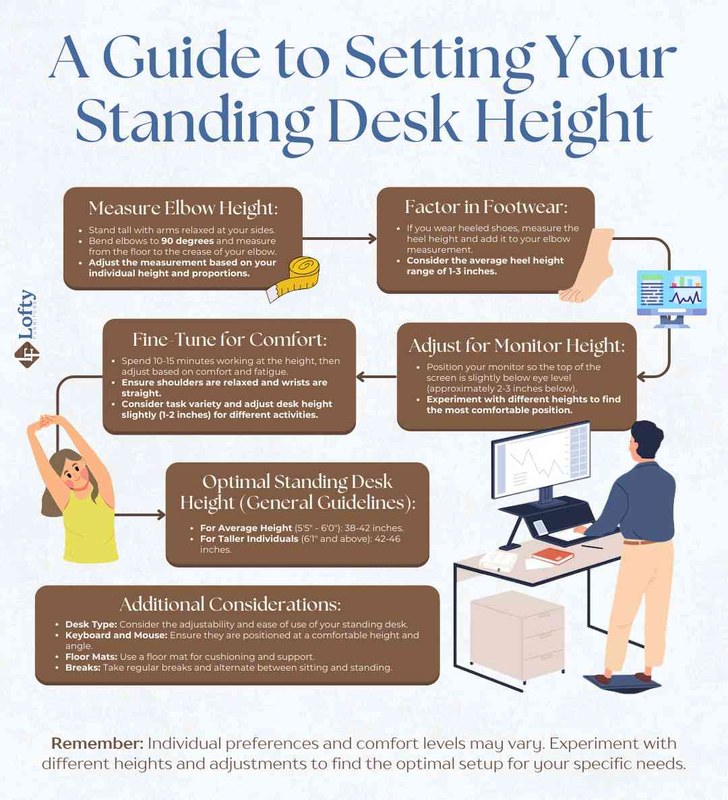
A standing desk is adjusted for neutral arm and monitor height.
The simplest way to set a standing desk correctly is to build the setup from the ground up: feet planted, shoulders loose, elbows bent, keyboard at hand level, and monitor raised to a comfortable viewing position. In 2026, the equipment itself has improved, but the posture basics remain the same.
Place your feet about hip-width apart and let your shoulders relax instead of pulling them back aggressively.
Adjust the desktop until your forearms are close to parallel with the floor and your wrists stay straight while typing.
Lift or lower the monitor so the top of the display is around eye level and the screen sits at a comfortable viewing distance.
Ideal keyboard, mouse, and monitor placement for a neutral posture
Your keyboard and mouse should sit close enough that your upper arms stay near your sides. Reaching forward for long periods can create tension through the shoulders and upper back, even if the desk height itself is technically correct.
The keyboard should allow your wrists to remain mostly straight, not tipped upward. A very thick desktop plus a tall keyboard can force your hands too high, which is one reason some people prefer a slim keyboard with a standing setup.
Your mouse should be on the same level as the keyboard and close enough that you are not winging your elbow outward. If you use two monitors, center the one you use most often directly in front of you. If both are used equally, place them close together and center the gap with your body to reduce neck rotation.
Laptop-only setups are often the hardest to get right because the screen and keyboard are attached. For longer work sessions, an external keyboard and mouse paired with a laptop stand is usually the easier route to neutral posture.
When to use anti-fatigue mats, monitor arms, and footrests
Accessories can improve comfort, but they work best when they solve a specific problem rather than adding clutter.
An anti-fatigue mat can help if your floors are hard and you stand for longer stretches. It does not replace good posture, but it may reduce pressure underfoot and make it easier to shift weight naturally.
A monitor arm is useful when the screen height range on the desk itself is too limited or when you want to free up desktop space. It can also help in small workstations where a deep monitor base steals valuable room.
A footrest is not just for sitting. Some people like a low foot bar or small foot support while standing because it encourages movement and lets them alternate leg position, which can ease lower-back tension.
Accessory needs vary by setup. A desk with a shallow top, a laptop-only workflow, or a thick monitor base may need more adjustment help than a larger desk with separate peripherals and a monitor arm.
What to Look for When Choosing a Standing Desk
Once you know your likely working height, it becomes easier to judge whether a desk will actually fit your body and your room. The best model for posture is not always the most expensive one; it is the desk whose range, stability, and surface size match your real setup.
Height range, weight capacity, stability, and adjustment speed
Height range is the first specification to check. A desk that does not go low enough for shorter users or high enough for taller users will always be a compromise, no matter how attractive the finish is.
Weight capacity matters if you use heavy monitors, audio gear, desktop computers, or shelving attachments. A desk can look spacious but still struggle once the load increases, especially at taller standing heights where wobble becomes more noticeable.
Stability is especially important if you type heavily, use a monitor arm, or lean on the desk while working. Some frames stay solid through the full range, while others feel stable at sitting height and less confident once fully raised.
Adjustment speed is mostly a convenience factor, but it affects daily usability. If changing positions feels slow or disruptive, some people end up moving the desk less often than planned.
Desktop size, cable management, memory presets, and noise levels
Desktop size should reflect what actually lives on the desk every day. If you use one laptop and a notebook, a compact top may be enough. If you need dual monitors, speakers, a lamp, and paper workspace, surface depth and width become much more important.
Cable management is easy to overlook until cords start catching during height changes. Look for trays, channels, or at least enough underside clearance to route cables cleanly. A tidier cable path also helps the desk look calmer in open-plan or multipurpose rooms.
Memory presets are especially useful for shared desks or for people who switch between multiple standing and sitting positions. They are not essential, but they remove guesswork.
Noise levels matter most in apartments, shared homes, and guest-room offices. Electric desks vary by model, so it is smart to check the manufacturer listing and current buyer feedback before choosing.
Manual vs electric standing desks: which suits your home office better
Manual standing desks can suit lighter-use spaces, occasional standing, or buyers who want fewer powered components. They may also appeal in minimalist rooms where simple mechanics feel more in line with the furniture style.
Electric standing desks are generally more convenient for frequent transitions, shared use, and heavier setups. They are often the better fit if you expect to change height several times a day rather than once in the morning.
If storage is part of your buying decision too, Hurrell Editions has a separate guide on how to choose a desk with storage, which can help you balance drawers, legroom, and cable space without overcrowding the workstation.
Best Standing Desk Heights by User Type, Room, and Work Style

Chart comparing standing desk heights across users, rooms, and work styles.
The same desk can feel excellent in one home office and awkward in another. Room size, user height, and the way you work all shape what “best” looks like.
Fit for shorter users, taller users, shared setups, and hybrid workers
Shorter users should pay close attention to the desk’s minimum height, especially if they plan to sit as well as stand. A desk that starts too high can create shoulder tension even before the standing range becomes relevant.
Taller users should verify both maximum height and frame stability at full extension. A desk that technically rises high enough may still feel shaky if heavily loaded.
Shared setups benefit from electric controls with presets, simple cable routing, and enough range to accommodate both users comfortably. Hybrid workers who move between laptop work, video calls, and paperwork may also want a deeper top so they can rearrange tools without compromising posture.
How the desk works in small home offices, guest rooms, and multipurpose spaces
In small rooms, the desk footprint matters just as much as height adjustment. A standing desk needs enough clearance to move freely without bumping shelves, windowsills, or bed frames.
Guest rooms and multipurpose spaces often benefit from streamlined tops, quieter motors, and finishes that blend into residential decor rather than looking overtly corporate. If you are working with a tighter footprint, a guide to the best small desk with storage can help compare compact options that still support everyday function.
L-shaped desks can be useful when you need separate zones for computer work and paperwork, but they also demand more floor space and careful monitor placement. For larger corner layouts, Hurrell Editions also covers the best L shaped standing desk with storage.
Materials, Build Quality, and Design Details That Matter
Ergonomics comes first, but materials and design still influence long-term satisfaction. A standing desk is a moving piece of furniture, so the desktop, frame, and finish all need to support regular adjustment.
Desktop materials, frame construction, and finish durability
Desktop materials vary widely by model. Some use solid wood, some use veneer over engineered wood, and many use laminate surfaces. Each can work well, but durability depends on construction quality, edge finishing, and how the desk will be used.
Laminate can be practical for busy home offices because it is often easier to wipe clean and less prone to visible everyday marks. Wood surfaces can offer more warmth and visual depth, but care needs vary by finish and manufacturer guidance.
Frame construction affects stability, especially at standing height. Heavier-duty legs, better cross support, and cleaner engineering often show up in reduced wobble and smoother adjustment, though exact performance varies by model.
How to match a standing desk with existing decor and Hurrell Editions-inspired styling
A standing desk does not have to look clinical. In a home office, it often works best when the finish relates to other pieces in the room, such as shelving, frames, lighting, or flooring tones.
For a softer editorial look, pair a warm wood or muted matte desktop with a simple task lamp, restrained cable management, and a few framed prints rather than too many desktop accessories. White desks can brighten darker corners, while black or walnut finishes can ground a room with more visual weight.
Try to keep the visual line around the desk calm. That usually means fewer exposed cords, one or two intentional decorative objects, and storage that hides the practical clutter.
For a polished home-office look, combine a slim standing desk with a neutral chair, a low-profile monitor arm, and framed artwork that echoes the desk finish rather than competing with it.
Benefits, Limitations, and Common Standing Desk Mistakes
Standing desks can be genuinely helpful, but they are not magic. The real benefit comes from better alignment and more movement throughout the day, not from standing for the longest possible stretch.
Posture, comfort, focus, and movement benefits
When adjusted well, a standing desk can support a more open chest position, reduce the tendency to slump, and make it easier to alternate posture during long workdays. Many people also find that changing positions helps with focus, especially during repetitive computer tasks.
The biggest practical advantage is flexibility. You can sit for concentrated work, stand for calls or email, and keep your body from staying locked in one position for hours.
Why standing all day is not the goal
A standing desk is best viewed as a movement tool, not a command to remain upright from morning to evening. Standing too long can create its own discomfort, especially in the feet, knees, hips, and lower back.
Alternating between sitting and standing is usually more realistic and more comfortable than trying to replace sitting completely. Shorter standing intervals repeated through the day are often easier to maintain.
Setup errors that can cause shoulder, wrist, neck, or lower-back strain
Common mistakes include setting the desk too high, leaving the monitor too low, reaching too far for the mouse, and using a laptop without external accessories for full workdays. Another frequent issue is locking the knees and standing too stiffly instead of shifting weight and moving naturally.
Lower-back strain can also come from leaning forward into the screen or from a desk depth that forces awkward viewing distance. If something still feels off after adjustment, check the whole chain: floor, shoes, desk height, monitor height, and input devices.
- Set the desktop near elbow height with relaxed shoulders.
- Use external peripherals if you work from a laptop for long periods.
- Alternate between sitting and standing through the day.
- Copying someone else’s desk height without checking your own posture.
- Leaving the monitor too low after raising the desk.
- Assuming more standing automatically means better ergonomics.
Care, Maintenance, and Long-Term Value
A standing desk can last for years if the moving parts and work surface are treated well. Care requirements differ by brand and material, so the official product page and manufacturer instructions should always guide the final decision.
Cleaning surfaces, protecting motors, and maintaining smooth height adjustment
For regular cleaning, use the surface-care instructions provided by the manufacturer. In general, it helps to wipe spills promptly, avoid harsh cleaners unless specifically approved, and keep dust from collecting around controls and moving components.
Motors and lifting columns usually benefit from simple habits: do not overload the desk beyond its stated capacity, keep cable runs from snagging during movement, and avoid forcing the desk if something blocks its travel.
If the desk starts moving unevenly or making unusual noise, check the assembly instructions and troubleshooting guide before continuing to use it. Some issues come from loose hardware rather than motor failure.
Always confirm cleaning products, load limits, and reset procedures with the manufacturer. Surface finishes and motor systems vary, and the wrong cleaner or excess weight can shorten the desk’s lifespan.
When a premium standing desk is worth the investment
A premium standing desk can be worth it if you work from home daily, need strong stability at taller heights, use heavy equipment, or plan to keep the desk for many years. In those cases, smoother adjustment, better materials, and a wider usable range can make a real difference.
For lighter use, a simpler desk may be enough, provided the height range fits your body and the frame remains stable. Value comes from fit and reliability, not just features on a spec sheet.
Final Recommendation: How to Choose the Best Height of Standing Desk for Your Space
The smartest way to choose a standing desk is to start with your body and your room, then compare desk specifications against those needs. A beautiful desk that misses your usable height range or lacks enough depth for proper screen placement is unlikely to improve posture for long.
The most important measurements to prioritize before buying
First, measure your approximate seated and standing elbow heights while wearing typical work shoes. Then check monitor size, keyboard thickness, and how much desktop depth you need to keep the screen at a comfortable distance.
Also measure the room itself, including wall clearance, nearby furniture, and whether the desk can rise without interfering with shelves or window trim. If the desk includes storage, make sure it does not reduce knee space or force awkward arm position.
A practical checklist for better posture and everyday usability
If posture is your main goal, prioritize a desk that reaches your true working range, stays stable at that height, and supports proper monitor placement. After that, look at convenience features like presets, cable management, and finish.
- Confirm the desk’s minimum and maximum height against your seated and standing elbow positions.
- Check that the desktop is deep enough for comfortable monitor distance.
- Verify weight capacity for monitors, arms, speakers, and accessories.
- Look for stability feedback at taller heights, not just at seated level.
- Review manufacturer care instructions, warranty terms, and current specifications before ordering.
If you remember one thing, let it be this: the best standing desk height is the one that keeps your shoulders relaxed, wrists neutral, and screen comfortably in view. Get those three relationships right, and the rest of the buying decision becomes much easier.
Frequently Asked Questions

One Comment