How to Stand at a Standing Desk the Right Way

Set your standing desk so your elbows rest around 90 degrees, your monitor sits at eye level, and your knees stay softly bent. Stand for short intervals, shift often, and alternate with sitting and walking instead of trying to stand all day.
Knowing how to stand at a standing desk starts with a simple goal: create a posture that feels balanced, relaxed, and easy to maintain for short stretches, then alternate it with sitting and walking. A standing desk can support better movement habits in a home office, but the desk itself is only part of the equation; monitor height, keyboard placement, footwear, flooring, and how often you change position matter just as much.
- Desk height: Adjust it so forearms rest naturally and shoulders do not lift.
- Screen position: Center the monitor and keep the top near eye level.
- Lower-body posture: Distribute weight evenly and avoid locking your knees.
- Time strategy: Start with short standing intervals and change position often.
- Setup matters: A monitor arm, supportive flooring, and tidy cables can improve comfort.
How to Stand at a Standing Desk the Right Way: The Core Setup Rules
The best standing-desk posture is neutral rather than rigid. You are not trying to “stand perfectly” like a statue. Instead, you want your joints stacked comfortably, your arms supported at a natural angle, and your screen positioned so you are not craning your neck or hunching your shoulders.
Set desk height so elbows rest at roughly 90 degrees
Start with the desk at a height where your elbows can bend at about 90 degrees while your upper arms stay close to your sides. Your forearms should float comfortably over the keyboard rather than reaching upward or dropping downward. If the desk is too high, your shoulders may creep up toward your ears. If it is too low, you may round forward through the upper back.
This is why standing-desk height cannot be copied exactly from someone else’s setup. It depends on your height, shoe choice, keyboard thickness, and whether you use a wrist rest or desk mat. If you switch between shoes, slippers, or barefoot standing at home, you may need to make small adjustments.
Save two or three desk presets if your model allows it: one for sitting, one for standing in shoes, and one for standing barefoot or in house slippers. Small height differences can change shoulder and wrist comfort more than many people expect.
Keep wrists neutral, shoulders relaxed, and screen at eye level
Your wrists should stay as straight as possible, not bent sharply upward, downward, or sideways. A neutral wrist position usually happens when the keyboard is close enough that you do not have to reach for it and low enough that your hands are not cocked back. Your mouse should sit near the keyboard so one arm is not constantly drifting outward.
Shoulders should feel relaxed and broad, not pulled back aggressively and not rounded forward. A common mistake is trying so hard to “sit up straight” while standing that the body becomes tense. Good posture should feel supported, not theatrical.
For the screen, aim to keep the top of the monitor at or just below eye level, with the display centered in front of you. That usually helps reduce neck flexion. If you wear bifocals or progressive lenses, you may prefer the monitor slightly lower to avoid tipping your head back.
- Keep the monitor directly in front of you.
- Place the keyboard close enough that elbows stay near your torso.
- Let shoulders stay loose instead of pinning them back.
- Tilting your chin upward to see the screen.
- Reaching forward for the mouse all day.
- Bending wrists against the desk edge.
Stand tall with even weight distribution and a soft bend in the knees
Your feet should rest about hip-width apart, with your weight shared fairly evenly instead of dumped into one hip. Keep a soft bend in the knees rather than locking them out. Locked knees can make standing feel more tiring and may encourage you to hang on your joints instead of using your muscles gently.
Think of standing tall through the crown of the head while keeping the ribs and pelvis stacked naturally. You do not need to squeeze your glutes or brace your core constantly. A little shifting is normal and often helpful. In fact, subtle movement is better than trying to freeze in one “perfect” position.
Why Standing Desk Posture Matters in a 2026 Home Office
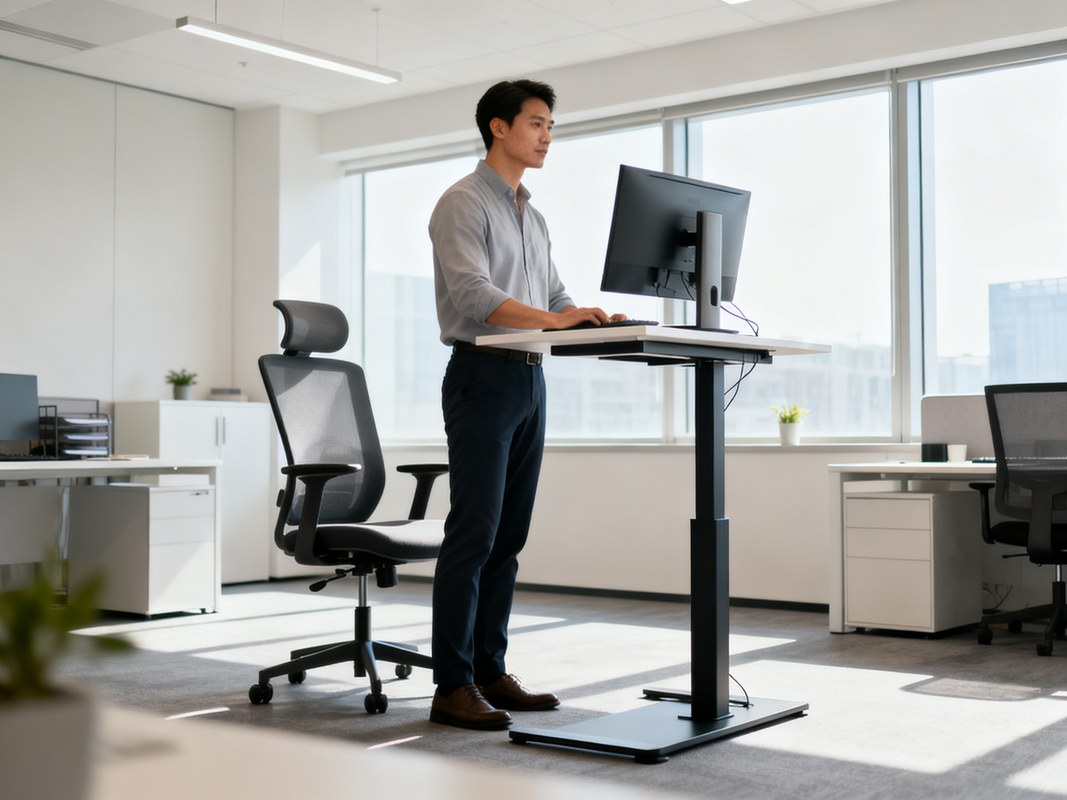
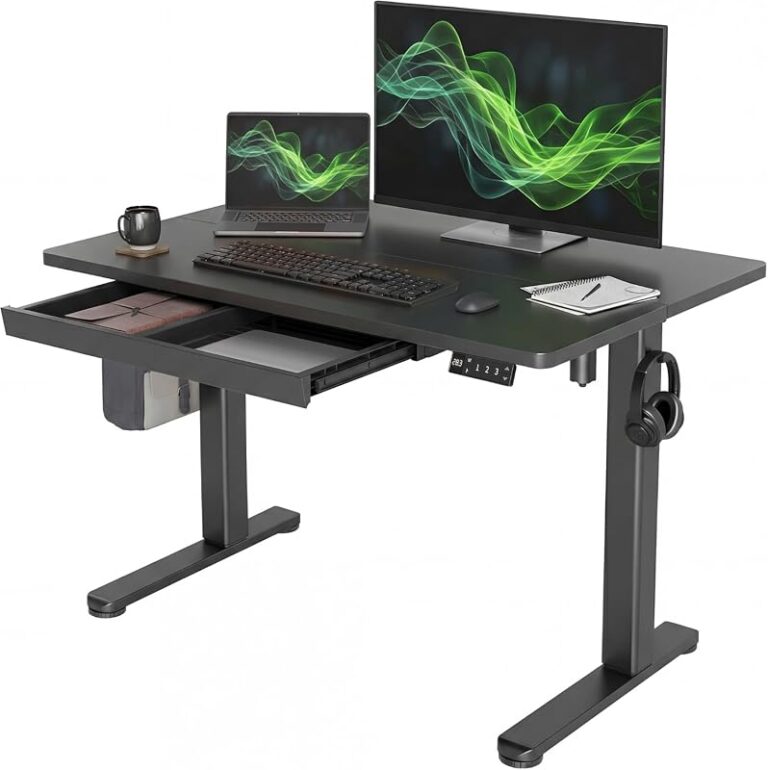
A home office setup shows proper standing desk posture and monitor height.
Standing desks remain popular because many home-office workers want more movement in the day without giving up computer-based work. But posture still matters, because a poor standing setup can simply trade one kind of discomfort for another.
Potential benefits for comfort, focus, and movement variety
A well-adjusted standing desk can make it easier to break up long seated stretches. For some people, that creates a sense of alertness, reduces feelings of stiffness, and encourages more frequent movement. It can also help certain tasks feel more dynamic, especially short admin sessions, video calls, reading, brainstorming, or light creative work.
In a home office, standing can also help establish rhythm. Many people find it useful to sit for deep-focus tasks, stand for email or meetings, and step away entirely for quick resets. That variety is often more realistic and beneficial than aiming to stand for hours at a time.
Limitations of standing too long without breaks or adjustment
Standing is not automatically better than sitting if you do it for too long without changing position. Extended static standing can lead to foot fatigue, lower-back discomfort, leg tiredness, and a general sense of restlessness. In other words, the problem is often not sitting versus standing; it is staying in any one posture for too long.
That is why the most useful mindset is not “I should stand more no matter what.” It is “I should move more, vary my posture, and set up my desk so neither sitting nor standing feels awkward.”
What current evidence can and cannot prove about standing desks
Current evidence supports the idea that reducing prolonged sedentary time and adding movement variety can be helpful. What it does not prove is that simply buying a standing desk will solve pain, improve health outcomes for everyone, or replace exercise. Results vary based on the setup, the user’s habits, the kind of work being done, and any existing mobility or pain issues.
If you have persistent pain, circulation concerns, balance issues, or a medical condition that affects posture or standing tolerance, it is wise to check with a qualified clinician rather than relying on generic desk advice alone.
A standing desk is best viewed as a posture-changing tool, not a cure-all. Manufacturer claims, health headlines, and social media routines often sound more definitive than the evidence actually is.
What to Look for in a Standing Desk Setup Before You Start
Before you fine-tune posture, make sure the desk and accessories can actually support an ergonomic setup. A desk that wobbles, tops out too low or too high, or cannot accommodate your monitor and peripherals will be harder to use well.
Desk height range, stability, and weight capacity
The desk should adjust low enough for comfortable sitting and high enough for comfortable standing based on your height. That range matters more than a generic “one size fits all” claim. Stability matters too, especially if you type heavily, use dual monitors, or lean into creative work that involves sketching, note-taking, or equipment.
Weight capacity is worth checking if you use large screens, speakers, a desktop computer, or storage add-ons. Confirm the official specifications on the product listing before buying, since capacity and stability vary widely by model.
If your setup needs built-in organization as well as height adjustment, Hurrell Editions also has a guide on how to choose a desk with storage, which can help you think through drawers, shelving, and cable-hiding tradeoffs.
Monitor arm, keyboard placement, and cable management essentials
A monitor arm can make a major difference because it allows more precise screen height and distance adjustment than many fixed stands. This is especially helpful if the desk surface rises and lowers often. It can also free up desktop space and make the workstation look calmer.
Keyboard placement should allow your elbows to stay near your sides, and the mouse should be close enough that you are not constantly abducting the shoulder. If you use a laptop as your main device, an external keyboard and mouse usually make it easier to create a better standing posture because the laptop screen and keyboard are otherwise locked together.
Cable management matters more than it seems. Loose cables can tug when the desk moves, clutter foot space, and make the setup feel temporary or improvised. If you are building a more streamlined creative workspace, a guide on how to organize a desk for artist work offers useful ideas for keeping tools accessible without crowding the work zone.
Footwear, floor surface, and anti-fatigue mat considerations
Your floor and footwear affect comfort just as much as arm position. Hard flooring can make long standing sessions feel harsher, while supportive shoes or a good anti-fatigue mat can reduce pressure underfoot. That does not mean everyone needs a thick mat, but many people find one helpful if they stand often.
If you work barefoot at home, pay attention to whether the floor feels cold, slippery, or unforgiving. A mat can improve both comfort and traction. Just make sure it does not create a tripping hazard around chair wheels or nearby storage.
- Confirm the desk’s height range suits both your seated and standing positions.
- Check official weight capacity if you use heavy monitors or accessories.
- Consider whether you need a monitor arm, external keyboard, or anti-fatigue mat.
- Measure nearby clearance for desk movement, chair storage, and walking space.
How Long You Should Stand at a Standing Desk Each Day
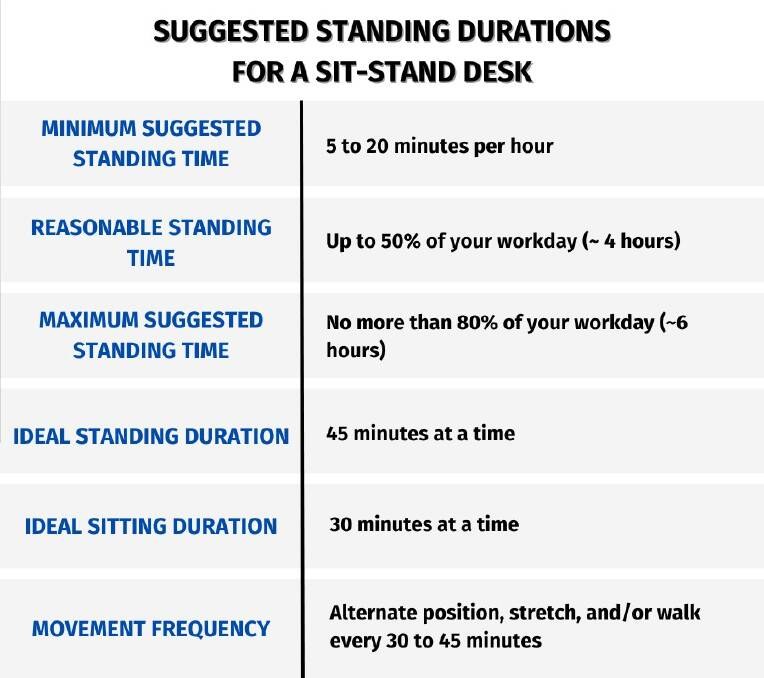
An adjustable desk supports both standing and seated work throughout the day.
There is no single ideal number of standing hours that suits everyone. A better approach is to build tolerance gradually and focus on regular posture changes instead of chasing a fixed target.
A practical sit-stand ratio for beginners
For beginners, a simple starting point is to stand for short intervals, such as 15 to 30 minutes at a time, then return to sitting. Over time, you can adjust based on comfort, workload, and how your body responds. Many people do better with multiple short standing periods across the day than with one long block.
If you are new to a standing desk, start conservatively. It is common to feel enthusiastic at first and then end the day with sore feet or a tight lower back because the body was asked to do too much too soon.
How often to change position, walk, and reset posture
Try to change something regularly: sit down, stand up, take a short walk, roll the shoulders, or reset your foot position. Even brief movement breaks can help interrupt static loading. A standing desk works best when it supports these transitions rather than replacing one static posture with another.
Some people pair standing with task changes: standing for calls, sitting for concentrated writing, and taking a lap around the room after finishing a block of work. In smaller creative setups, this can be especially effective when combined with thoughtful room planning, as discussed in our guide on how to set up a home art studio space.
Signs your body needs a break, adjustment, or different setup
Pay attention to early warning signs rather than pushing through them. Common clues include numb feet, calf tightness, pressure in the lower back, rising shoulders, wrist strain, or the urge to lean heavily on the desk. Those signs usually mean it is time to sit, walk, lower or raise the desk slightly, or reassess your screen and keyboard position.
Discomfort does not always mean standing is wrong for you. Sometimes it simply means the interval is too long, the desk height is off, or the workstation needs one missing component, such as a monitor riser, arm, or mat.
Common Standing Desk Mistakes That Cause Discomfort
Most standing-desk discomfort comes from a handful of repeat mistakes. The good news is that they are usually fixable with small adjustments rather than a full workspace overhaul.
Locking the knees, leaning on one hip, and reaching for the keyboard
Locked knees make the body feel stiff and can encourage fatigue. Leaning into one hip may feel easier in the moment, but over time it creates an uneven stance that can irritate the lower back or hips. Reaching forward for the keyboard pulls the shoulders and head out of alignment.
Bring the tools to you instead of drifting toward the tools. Your keyboard and mouse should support a compact arm position, and your stance should feel balanced rather than slouched into one side.
Using a monitor that is too low, too close, or off-center
A low monitor usually leads to neck flexion and upper-back rounding. A screen that is too close can make you hunch or strain visually, while an off-center display encourages constant neck rotation. If you use two monitors equally, position them as symmetrically as possible. If one is primary, center that one and place the secondary screen off to the side.
Laptop-only setups are especially prone to this problem. Without accessories, the screen is almost always too low once the keyboard is at typing height.
Standing still for too long instead of building in movement
One of the biggest myths around standing desks is that more standing is always better. In reality, standing motionless for long stretches can be just as unhelpful as sitting motionless. Shift your stance, change foot position, take a short walk, or alternate tasks. Gentle movement is part of good standing posture, not a sign that you are doing it wrong.
Who a Standing Desk Setup Suits Best and Which Home Office Layouts Work Well
Standing desks can work well in many home offices, but they are especially useful where flexibility matters more than a large, fixed workstation.
Best fit for compact studies, shared rooms, and flexible work zones
In compact studies or multipurpose rooms, a standing desk can help one area serve more than one working style. It can also be a smart option in shared rooms where different users need different working heights. For hybrid households, the adjustability can make one desk more versatile than a fixed-height alternative.
That said, the desk still needs enough surrounding clearance to move freely. In a small room, a compact footprint and clean cable routing often matter more than adding oversized accessories.
When a standing desk works better than a fixed-height desk
A standing desk often makes more sense than a fixed-height desk if you know you like to alternate posture, share the workspace, or use the room for different tasks throughout the day. It can also be useful if your current desk forces compromises in monitor height or arm position.
By contrast, if you rarely change posture, need a very large uninterrupted work surface, or prioritize maximum simplicity, a fixed-height desk may still be the better fit.
Space planning, placement, and clearance around the desk
Check the wall, shelving, windowsill, and artwork around the desk before choosing a height-adjustable model. Make sure the desk can rise without hitting ledges, low shelves, or décor. Also think about chair parking space, walking routes, and whether drawers or cabinets nearby will still open comfortably.
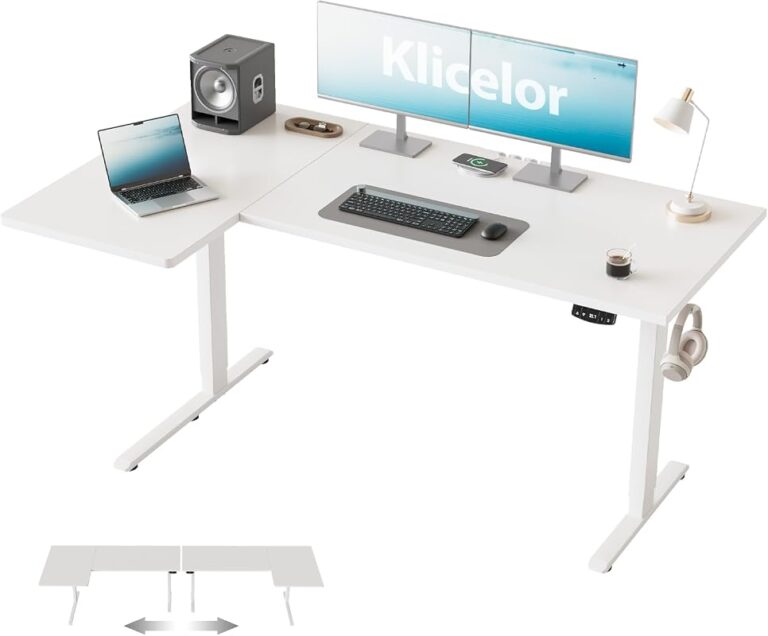
If you are considering a corner arrangement, an L-shaped model can make sense for multitasking, but footprint and reach zones matter. For that style of setup, Hurrell Editions’ look at the best L-shaped standing desk with storage can help you think through layout tradeoffs.
Styling a Standing Desk So It Looks Refined, Not Clinical
An ergonomic setup does not have to look like a corporate cubicle. With the right materials and restraint, a standing desk can feel integrated into the room rather than visually dominating it.
Choosing finishes, materials, and accessories that suit your decor
Wood-look tops, matte frames, soft neutral accessories, and coordinated storage can make a standing desk feel more residential. Black metal frames often suit modern interiors, while warmer wood tones can soften the look in classic or transitional rooms. The key is consistency: too many mismatched devices and organizers can make the setup feel busy.
Accessories should earn their place. A monitor arm in a matching finish, a simple task lamp, and one or two useful trays usually look better than a crowded desktop full of holders and stands.
Balancing ergonomics with lighting, storage, and visual calm
Good styling still has to preserve function. Leave enough clear surface for keyboard movement and note-taking. Keep task lighting positioned so it does not create screen glare. Hide cables where possible, and avoid placing decorative objects where they interfere with posture or movement.
Visual calm matters in a home office because clutter often pushes practical items into awkward positions. A cleaner layout makes it easier to keep the screen centered, the keyboard close, and the standing area unobstructed.
- Repeat one or two finishes, such as oak and matte black, instead of mixing many tones.
- Use closed storage nearby for chargers, notebooks, and tech extras you do not need on the desktop.
- Choose a desk mat that complements the room while also defining the work zone.
- Keep décor low-profile so it does not block monitor movement or sight lines.
Ideas for integrating a standing desk into modern, classic, or minimalist rooms
In a modern room, pair a slim desk frame with clean-lined lighting and restrained accessories. In a classic room, a warmer top, tailored chair, and framed art can help the desk feel less technical. In a minimalist room, focus on negative space, concealed cables, and a limited palette so the workstation blends quietly into the architecture.
The most polished setups usually feel intentional rather than overdesigned. A standing desk should support the room’s rhythm, not fight it.
Care, Maintenance, and Long-Term Value of a Standing Desk Setup
A standing desk is a moving piece of furniture, so a little maintenance helps preserve both function and comfort over time.
Cleaning desktop surfaces, mats, and moving components
Clean the desktop according to the manufacturer’s care instructions, since finishes vary. Dust, fingerprints, and spills are usually straightforward to manage, but harsh cleaners can damage some laminates, veneers, or coatings. Anti-fatigue mats also benefit from regular wiping so grit does not build up where you stand most often.
Keep the lifting path clear of baskets, cords, and small objects underneath the desk. Anything that snags during height adjustment can strain the setup or create unnecessary wear.
Always follow the desk maker’s cleaning, load, and adjustment guidance. If the desk develops unusual noise, wobble, or inconsistent movement, check the official manual and warranty terms before attempting repairs.
Checking motors, presets, fasteners, and monitor arms over time
Over time, it is worth checking that fasteners remain snug, monitor arms hold position properly, and saved presets still land where you expect. If your desk is motorized, review the manufacturer’s instructions for reset procedures and usage limits. Specifications, warranty coverage, and maintenance recommendations vary by brand and model, so confirm them on the official listing or product manual.
Monitor arms and cable trays should also be inspected occasionally, especially if you reconfigure the desk often or add heavier equipment later.
Final recommendation: build a movement-friendly setup rather than standing all day
The best way to use a standing desk is to treat it as part of a movement-friendly home office, not as a command to stay upright for hours. Set the desk so your elbows rest near 90 degrees, keep your screen at a comfortable height, stand with balanced weight and soft knees, and alternate regularly between sitting, standing, and walking.
If you are deciding where to invest first, prioritize adjustability, monitor positioning, and enough surrounding space to move well. Those choices usually matter more than chasing a perfect posture ideal, and they are what make a standing desk genuinely useful over the long term.
Frequently Asked Questions